
NVMe vs SATA SSD: Which Should You Buy in 2026?
TL;DR — Quick Answer
NVMe SSDs are faster than SATA SSDs in almost every scenario, and in 2026 they cost about the same. Buy NVMe unless your device only has a 2.5-inch SATA bay — such as an older laptop or desktop with no M.2 slot — or you’re replacing a drive in a NAS that specifically requires SATA.
How to Read This Guide
Every section below is written so that the first sentence answers the question directly. If you’re skimming for a quick answer, just read the opening line of each section. If you want context, keep reading.
This guide is for anyone deciding between an NVMe M.2 drive and a SATA SSD for a new build, upgrade, or laptop swap. We don’t recommend specific products here — for that, see our Best NVMe SSD and Best Budget NVMe SSD roundups.
Quick Reference
| Term | What it means | Why it matters |
|---|---|---|
| NVMe | Non-Volatile Memory Express — a protocol designed for SSDs, communicates over PCIe | Much higher bandwidth ceiling than SATA |
| SATA | Serial ATA — an older interface originally built for spinning hard drives | Limited to ~550 MB/s; still works in older systems |
| PCIe | Peripheral Component Interconnect Express — the bus NVMe drives use | More bandwidth lanes mean faster data transfer |
| M.2 | A physical form factor (slot shape) | Can carry either NVMe or SATA — slot type matters |
| 2.5-inch | Traditional drive form factor for SATA SSDs | Fits older laptops and desktops with SATA bays |
| HMB | Host Memory Buffer — lets DRAM-less SSDs use system RAM as cache | Narrows the gap between DRAM-less and DRAM drives |
What is NVMe?
NVMe (Non-Volatile Memory Express) is a communication protocol designed from the ground up for solid-state storage, running over PCIe lanes rather than the legacy SATA bus. The short version: NVMe drives talk to your CPU using the same high-speed connection your graphics card uses, which is why they’re so much faster than older drive interfaces. A modern PCIe 4.0 NVMe drive reads data at up to 7,500 MB/s. That’s roughly 14 times faster than a SATA SSD, which tops out near 550 MB/s.
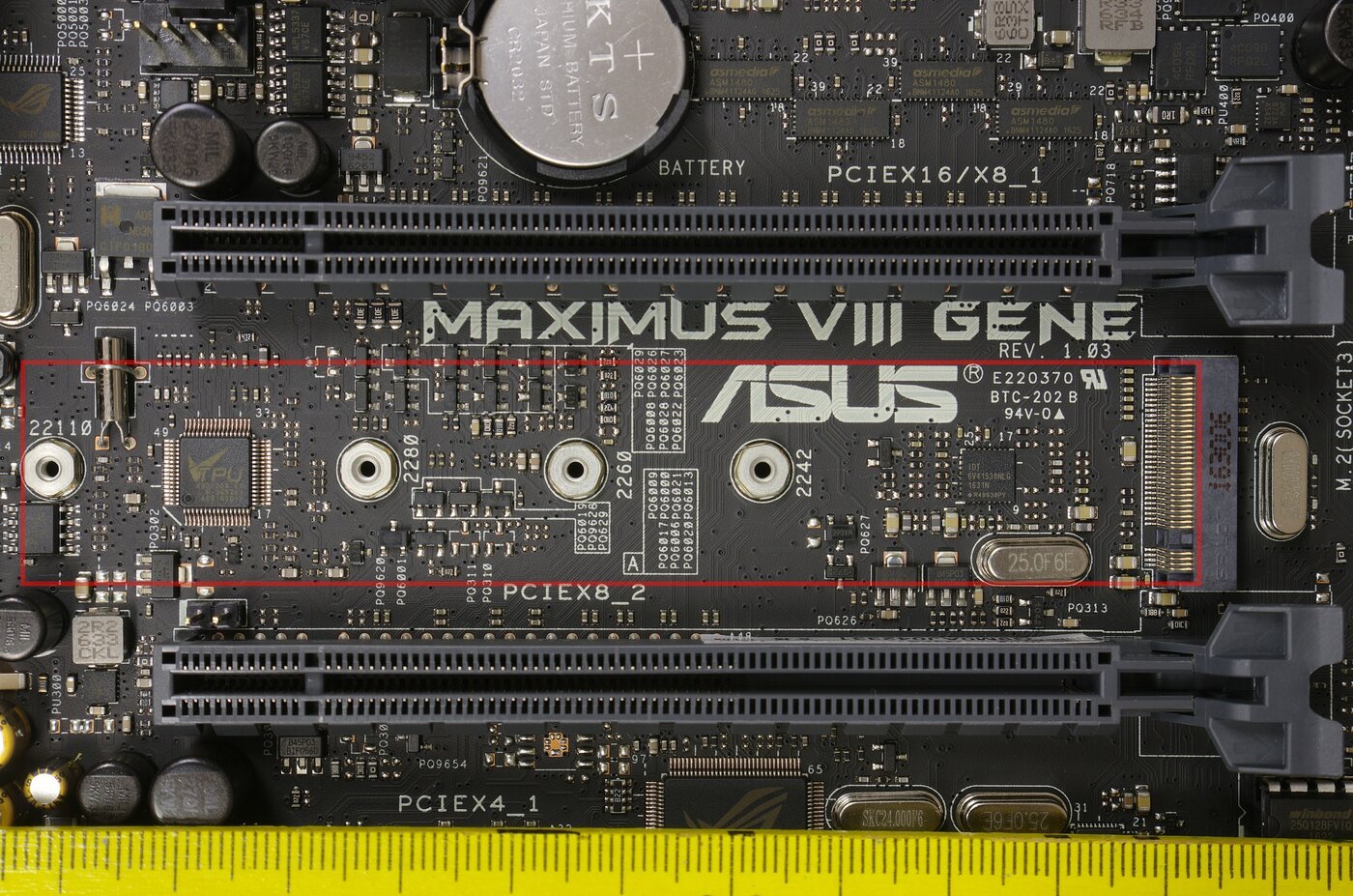
NVMe drives come in the M.2 form factor — a narrow stick about the size of a stick of gum that plugs directly into a slot on your motherboard or laptop. Most motherboards made since 2018 have at least one M.2 slot. Most gaming laptops and ultrabooks since 2017 have one too. If your device has an M.2 slot, it almost certainly supports NVMe.
One thing to be aware of: M.2 is a physical slot shape, not a protocol. Some M.2 slots only support SATA, some only support NVMe, and some support both. Check your motherboard or laptop spec sheet before buying. If you plug an NVMe drive into an M.2 SATA-only slot, it simply won’t be detected.
What is a SATA SSD?
A SATA SSD uses the same interface as a traditional hard drive but replaces the spinning disk with flash memory, making it dramatically faster than an HDD while fitting into existing SATA bays. SATA SSDs are limited to roughly 550 MB/s sequential read and 520 MB/s sequential write — the SATA III interface caps at about 600 MB/s and that’s an absolute ceiling no SATA drive can exceed.
SATA SSDs come in the familiar 2.5-inch form factor (the same size as a laptop hard drive) as well as M.2 SATA (same stick shape as NVMe, different protocol). They are the right choice when your system doesn’t have an M.2 slot, when your M.2 slot only supports SATA, or when you’re upgrading a device that physically requires a 2.5-inch drive.
For older desktops and budget laptops that shipped with a spinning hard drive, a 2.5-inch SATA SSD is still one of the best-value upgrades available. The jump from HDD to SATA SSD is enormous — boot times drop from a minute to under 15 seconds, applications open faster, and the machine feels completely different. Going from SATA SSD to NVMe is less dramatic.
Which Is Faster?
NVMe is significantly faster than SATA in sequential read and write operations — anywhere from 5x to 14x faster depending on the drive generation. A PCIe Gen 4 NVMe drive reads at up to 7,300 MB/s; a SATA SSD reads at around 550 MB/s. There is no comparison on raw throughput.
For random I/O (the kind of access your OS makes when launching apps, opening files, or loading game assets), the difference is smaller but still meaningful. A modern NVMe drive delivers 500,000–1,000,000+ IOPS, while a top SATA SSD delivers 90,000–100,000 IOPS. In practice, you’ll notice the NVMe advantage when copying large files, extracting compressed archives, or loading large game levels with many assets.
Where you likely won’t notice the difference: loading a web browser, opening a text document, or booting Windows once it’s already been cached. These tasks are too quick and too bandwidth-light to saturate even a SATA SSD.
When Does It Actually Matter?
The NVMe vs SATA performance gap matters most in these scenarios:
Large file transfers. Copying 50GB of video footage from one folder to another, moving a game library, or extracting a large archive. NVMe will finish this in a fraction of the time a SATA drive would.
Video editing with large source files. If you’re pulling 4K RAW or 6K footage from your drive in real time, SATA’s 550 MB/s ceiling becomes a bottleneck. A single 6K RAW video stream can exceed 400 MB/s. Edit two streams simultaneously and you’ve saturated a SATA drive. NVMe doesn’t have this problem.
Game load times on titles with many small assets. Open-world games like Cyberpunk 2077 and Starfield benefit from higher IOPS because they stream thousands of small assets into memory simultaneously. The improvement over SATA is real, though often measured in seconds rather than minutes.
Where it doesn’t matter: Office documents, email, web browsing, light productivity apps. SATA is fast enough for all of these. The bottleneck in those workflows is usually the application or your CPU, not the drive.
Does NVMe Cost More Than SATA?
In 2026, NVMe SSDs are priced at parity with or below comparable SATA SSDs at most capacities. This wasn’t true a few years ago, but the cost of NAND flash has dropped and NVMe drive volumes have scaled significantly. There is no longer a meaningful price penalty for choosing NVMe over SATA when both options are available to you.
The exception is in specialized form factors. A 2.5-inch SATA SSD for a very old laptop or specific server application may cost a bit less than an M.2 NVMe alternative simply because NVMe in that segment hasn’t commoditized as fully. But for mainstream 1TB and 2TB capacities, NVMe drives are consistently cheaper or the same price as their SATA counterparts at major retailers.
Does NVMe Use More Power Than SATA?
In active use, NVMe drives can consume more power than SATA SSDs, though the gap varies significantly by drive. Older or performance-focused NVMe drives can pull 4–7W under load, while a SATA SSD typically stays under 3W. However, the latest generation of power-efficient NVMe drives — particularly DRAM-less designs like the WD Black SN7100 — are specifically engineered to minimize idle and active power draw, narrowing this gap considerably.
For laptop users, this is a real consideration. If you’re choosing between a SATA SSD and an NVMe SSD for a thin-and-light laptop where battery life is the priority, look at the specific TDP of the NVMe drive rather than assuming NVMe means worse battery life. Some modern NVMe drives rival SATA in power efficiency.
Which Should You Buy?
Buy NVMe if your device has an M.2 NVMe slot, which describes nearly every PC and laptop built since 2018. NVMe gives you more performance at the same price, with the only downside being slightly higher active power draw on older NVMe designs.
Buy SATA if your device only has a 2.5-inch drive bay with no M.2 slot, if your M.2 slot is SATA-only and you can’t add a true NVMe slot, or if you’re expanding storage in a NAS that requires SATA. In all of these cases, a quality 2.5-inch SATA SSD is still a fast, reliable storage option — it’s just not going to saturate your PCIe bus.
When in doubt: check your motherboard or laptop spec sheet for M.2 slot type. If it says “M.2 NVMe” or “PCIe M.2,” buy NVMe. If it says “M.2 SATA only,” buy M.2 SATA. If it only has 2.5-inch bays, buy a 2.5-inch SATA SSD.
For specific product recommendations, see our Best NVMe SSD roundup and Best Budget NVMe SSD guide.
Frequently Asked Questions
Is NVMe always better than SATA?
NVMe is faster than SATA in every measurable way, but “better” depends on whether your system supports it. If your device only has SATA bays, NVMe simply isn’t an option — buy the best SATA SSD that fits.
Can I use an NVMe drive in a SATA slot?
No. An NVMe M.2 drive is not compatible with an M.2 SATA-only slot, and vice versa. They use different signaling protocols. Some M.2 slots support both, but if your slot is SATA-only, an NVMe drive will not be recognized.
How much faster is NVMe than SATA for gaming?
NVMe reduces game load times by 5–30% compared to SATA, depending on the game and the drives being compared. Open-world games with large streaming assets show the biggest gains. For many games, particularly older or less demanding titles, the load time difference is a few seconds.
Is SATA SSD still worth buying in 2026?
A SATA SSD is still worth buying in 2026 if your device requires it. For any system with only a 2.5-inch drive bay — older laptops, budget desktops, or systems being upgraded from a spinning hard drive — a SATA SSD remains one of the best-value upgrades available. If you have the choice between SATA and NVMe, choose NVMe.
What does M.2 mean? Is it the same as NVMe?
M.2 refers to the physical form factor of the drive — the slot shape and connector. NVMe refers to the communication protocol. An M.2 slot can support either NVMe or SATA drives, depending on the motherboard. When people say “M.2 SSD,” they often mean NVMe, but technically M.2 SATA drives also exist.
Do I need PCIe Gen 5 in 2026, or is Gen 4 enough?
PCIe Gen 4 NVMe is enough for gaming, video editing, and general workstation use in 2026. PCIe Gen 5 drives offer speeds above 10,000 MB/s, which benefits AI model loading and extreme data pipeline workloads, but these are niche use cases for most people. Gen 4 also costs less and runs cooler.