How Much Storage Do You Need for Gaming in 2026?
TL;DR — Quick Answer
For PC gaming, 2TB is the practical minimum for a multi-game library in 2026. PS5 and Xbox Series X ship with 1TB but fill up fast — a 2TB upgrade is worth doing. Nintendo Switch 2 users should grab a 256GB–1TB microSD Express card. If you only play a few games at a time, you can get away with less — but you will spend more time managing installs than playing.
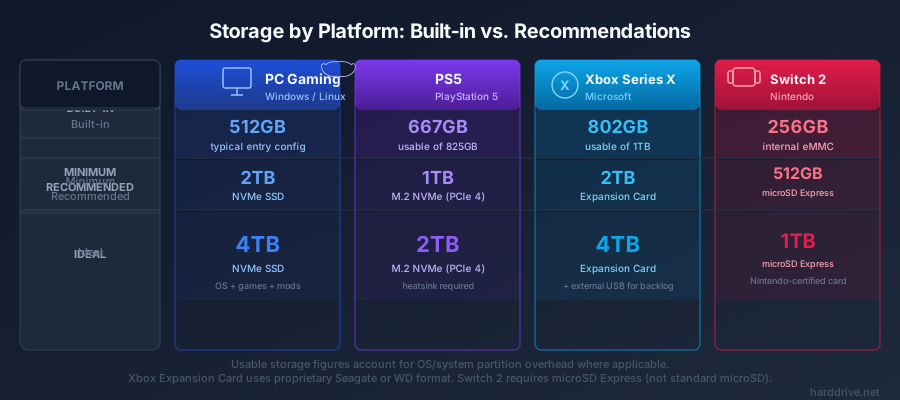
Quick Comparison by Platform
| Platform | Built-in Storage | Minimum Upgrade | Recommended | Notes |
|---|---|---|---|---|
| Gaming PC | Varies (often 1TB) | 1TB NVMe | 2TB NVMe | OS + apps eat 50–100GB |
| PS5 / PS5 Pro | 825GB (667GB usable) | 1TB M.2 NVMe | 2TB M.2 NVMe | External USB for PS4 games only |
| Xbox Series X | 1TB (802GB usable) | 1TB Expansion Card | 1TB Expansion Card + external USB | USB for backward-compat games |
| Xbox Series S | 512GB (364GB usable) | Storage Expansion Card | 1TB Expansion Card | Small internal storage a real constraint |
| Nintendo Switch 2 | 256GB UFS | 256GB microSD Express | 512GB–1TB microSD Express | Must use microSD Express format |
How We Calculated These Numbers
- Game size data comes from current storefronts (PlayStation Store, Xbox Store, Steam) and published developer specs.
- System overhead figures are based on reported usable storage after system software on each platform.
- “Number of games per drive size” calculations use a blended average of large AAA titles (~100GB) and mid-size games (~30GB), weighted toward how most people actually build a library.
- PC storage figures account for a Windows installation (~30GB), typical app overhead (~20GB), and page file/swap usage.
PC Gaming
How Much Storage Does a Gaming PC Need?
In 2026, 2TB of NVMe SSD storage is the sweet spot for most PC gamers. Here is why:
Windows 11 consumes roughly 30GB at installation and grows with updates. Add typical software (browser, Discord, streaming client, game launchers) and you are looking at 50–80GB of overhead before a single game is installed. On a 1TB drive, that leaves you roughly 900GB for games.
Modern AAA games are large and getting larger. The averages:
- Typical AAA release (2025–2026): 80–120 GB
- Call of Duty (full Modern Warfare install with all content): 300 GB+
- Cyberpunk 2077 with Phantom Liberty: ~75 GB
- Red Dead Redemption 2: ~150 GB
- God of War PC: ~34 GB (one of the lighter AAA titles)
- Baldur’s Gate 3: ~150 GB
- Microsoft Flight Simulator 2024: 50 GB base + substantial add-ons
On a 1TB drive with Windows overhead, you can fit roughly 8–10 large AAA games before you run out of space. That sounds like a lot until you account for the fact that many gamers keep 20–30 games installed simultaneously.
PC Storage Recommendations
Casual gamer (5–10 games installed): 1TB NVMe SSD. This works if you are disciplined about uninstalling games you are not actively playing.
Regular gamer (10–20 games installed): 2TB NVMe SSD. The practical minimum for a comfortable library without constant juggling.
Hardcore gamer or large library: 2TB primary NVMe SSD + a secondary 2TB SSD (or 4TB HDD) for overflow. Steam and most game launchers support multi-drive installs, so you can keep active games on the fast primary drive and archive others on cheaper secondary storage.
Future-proofing: Game sizes are not shrinking. A 2TB drive that feels spacious today may feel cramped in two or three years. If you are building a new rig, investing in 4TB now costs more but avoids an upgrade in 18 months.
For drive recommendations, see our Best NVMe SSD guide for the top PCIe Gen 4 options.
PS5
How Much Storage Does the PS5 Have?
The PS5 ships with an 825GB custom SSD. After system software and reserved storage, you have approximately 667GB of usable space for games and media. That is not a lot given modern game sizes.
How Many Games Fit on a PS5?
Let’s run the math at a 90GB average for PS5 native titles:
- 667GB usable internal storage: ~7 games
- 1TB M.2 expansion drive: ~11 games
- 2TB M.2 expansion drive: ~22 games
Mix in some smaller PS4 titles and indie games, and the numbers improve — but seven flagship PS5 games before you start deleting is genuinely limiting.
What PS5 Owners Should Do
Upgrade the internal M.2 slot. The PS5 has a user-accessible M.2 NVMe slot that Sony added for exactly this reason. A 2TB PCIe Gen 4 drive costs less than a new game and gives you room to breathe. See our Best SSD for PS5 guide for the specific drives to consider.
Use external USB for your PS4 library. An external drive connected to the PS5’s USB port can store and run PS4 games directly — no transfer needed. This keeps your PS4 back catalog off the internal drive and frees up M.2 space for PS5 titles. Note: external USB drives cannot run native PS5 games.
See our Best External SSD for PS5 and Xbox guide for external drive recommendations.
Xbox Series X/S
How Much Storage Does Xbox Series X Have?
The Xbox Series X ships with 1TB internal NVMe. After system overhead, usable space is approximately 802GB. That is better than the PS5’s baseline, but modern Xbox games — especially “Optimized for Xbox Series X” titles — are frequently 80–150GB.
The Xbox Series S is a different story: 512GB internal storage with only about 364GB usable. If you own a Series S, storage management is a constant concern.
How Many Games Fit on an Xbox?
At a 90GB average for optimized Series X titles:
- 802GB usable (Series X internal): ~8 games
- 512GB Seagate Storage Expansion Card: ~5 optimized games (plus whatever you can push to external USB)
- 1TB Seagate Storage Expansion Card: ~11 optimized games
What Xbox Owners Should Do
Understand the two-tier storage system. Optimized for Xbox Series X games need the internal SSD or a Storage Expansion Card (the proprietary NVMe card that slots into the back of the console). These are sold by Seagate and WD and provide identical performance to the internal drive.
Use external USB for your backward-compatible library. Xbox’s backward compatibility catalog spans thousands of original Xbox, Xbox 360, and Xbox One games. Those all play fine directly from a USB external drive. Keep your older library on cheap external storage and reserve internal/expansion card space for Series X optimized titles.
Series S owners especially should budget for a Storage Expansion Card alongside the console purchase — the 364GB usable space fills after just a few large titles.
Nintendo Switch 2
How Much Storage Does the Switch 2 Have?
The Nintendo Switch 2 ships with 256GB of UFS 3.1 internal storage — a significant upgrade over the original Switch’s 32GB. That said, Switch 2 games are larger than Switch 1 games, and 256GB will not last long for anyone buying physical and digital games.
Important: microSD Express Only
The Switch 2 uses the microSD Express format exclusively for storage expansion. Standard microSD cards from original Switch accessories do not work for running Switch 2 games. You must buy a microSD Express card.
Available capacities for microSD Express cards: 128GB up to 1TB (cards up to 2TB are supported as the format matures).
How Many Switch 2 Games Fit?
Switch 2 game file sizes vary significantly — from 5GB indie titles to 50GB+ for major releases. At a conservative 20GB average:
- 256GB internal: ~10–12 games
- 256GB microSD Express added: ~20–25 games total
- 1TB microSD Express added: ~55–60 games total
What Switch 2 Owners Should Do
Buy a 256GB to 512GB microSD Express card at purchase. Prices are falling as more manufacturers release cards. Samsung, SanDisk, and Lexar all make compatible options. If you buy primarily digital games, go for 512GB or 1TB — you will use it.
Future-Proofing Your Storage
Game sizes are growing at roughly 6–10GB per year on average, and that trend shows no sign of slowing. Uncompressed 4K textures, high-fidelity audio, and longer games all drive file sizes up.
A few principles that hold regardless of platform:
Buy more than you think you need. A 2TB drive feels generous today. In three years, it may feel tight. Buying 2TB instead of 1TB typically costs 20–40% more and extends the life of the drive by years.
Separate fast and slow storage. Active games on a fast NVMe or internal console drive; archived games on cheaper secondary storage. Most launchers and both Xbox and PS5 support this workflow natively.
SSDs for active play, HDDs for archives. If you are on PC or Xbox (where HDDs are an option), HDDs make sense for games you play infrequently. Loading times from an HDD are longer, but not intolerable for a game you open once a month.
Avoid going below 1TB in 2026. Even on a budget build, a 500GB drive will feel cramped almost immediately. 1TB is the minimum floor for any new gaming setup today.
Storage by Number of Games
Here is a rough guide to how many games fit on different drive sizes, assuming a mix of large AAA titles (~100GB) and mid-size titles (~30GB):
| Drive Size | Approximate Game Count | Notes |
|---|---|---|
| 500GB | 4–6 games | Very limiting; only works with aggressive install management |
| 1TB | 8–12 games | Workable for focused players |
| 2TB | 16–24 games | Comfortable for most gamers |
| 4TB | 32–50 games | Plenty for all but the largest libraries |
| 8TB | 65–100+ games | For serious collectors or game archives |
Frequently Asked Questions
How big are games in 2026?
The average AAA game install sits between 80–120 GB in 2026. Large live-service titles like Call of Duty can exceed 300 GB with all optional content packs. Smaller indie and mid-tier games still range from 5–30 GB, which helps balance out a library.
Does game size affect performance?
Storage capacity does not affect frame rate or graphics quality, but storage speed affects load times and open-world streaming. A fast NVMe SSD loads levels and textures faster than an HDD. On consoles, faster SSDs reduce the gap between fast travel and resuming gameplay.
Can I store games on an external drive and play them from there?
On PC, yes — any external SSD fast enough will work. On PS5, native PS5 games must be on the internal or M.2 SSD; PS4 games play from external USB. On Xbox, optimized Series X/S games must be on the internal SSD or Storage Expansion Card; older and backward-compatible games play from external USB.
Is it better to delete and redownload games or keep them on an external drive?
Keeping games on an external drive and transferring when needed is faster than redownloading — especially if your internet is slow. With fiber connections, redownloading 100GB games takes 15–30 minutes. With slower connections, having the game archived on an external drive saves hours.
Do I need NVMe or is SATA SSD good enough for gaming?
For consoles, you need NVMe (PS5 and Xbox’s expansion options are NVMe). For PC, SATA SSDs are noticeably slower than NVMe but still dramatically better than HDDs for loading. For casual gaming on a budget PC, SATA SSD is fine. For serious gaming or building a new rig, spend the small premium for NVMe. See our NVMe vs SATA SSD guide for the full breakdown.
How do I free up PS5 storage without deleting games?
Move games to an external USB drive (PS4 games can stay there; PS5 games must be transferred back to play). Delete game updates and patches for games you rarely play — some updates are 30–50GB of patches on top of the base install. Check the PS5’s storage management menu to see what is consuming the most space.
Will games keep getting bigger?
Yes. Game sizes have grown consistently over the past decade. The introduction of lossless audio and higher-resolution texture packs, plus larger open-world environments, means 200GB+ games will become common over the next few years. Factor that into any storage purchase you make today.